DigiCall
Description
DigiCall 
DigiCall is an Apps dedicated to generate Cards of phone numbers (called DigiCards) made of several dialing numbers (called DialCards) in order to produce a complex number that will be used for calling and interact with automated call center.
Screenshots
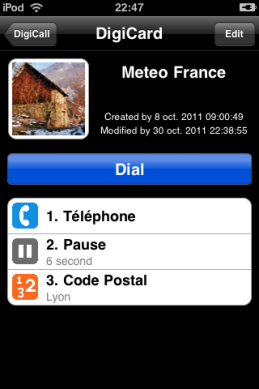
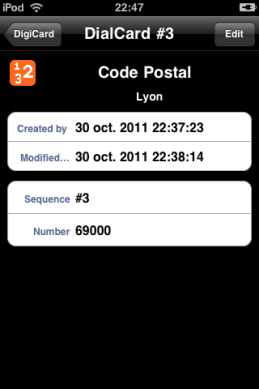
User Guide
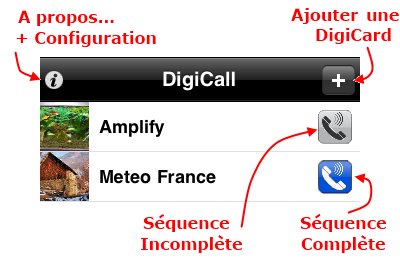
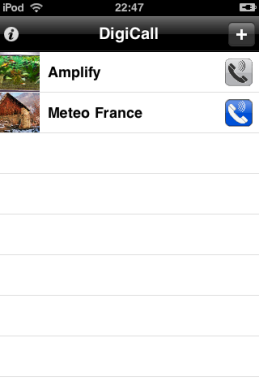
Main screen is composed of navigation bar and list of DigiCards.
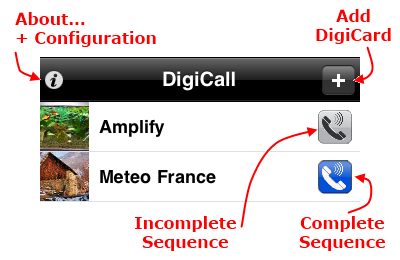
 Complete Sequence
DigiCard do not contains Contact or Keyboard cards. DigiCall will directly place your call.
 Incomplete Sequence
DigiCard contains Contact or Keyboard cards. To prepare your call, DigiCall will popup an Input screen in order to complete your call number. Once you have complete your dialing sequences, you can place your call. Your inputs are temporary and will only be used for the current call.
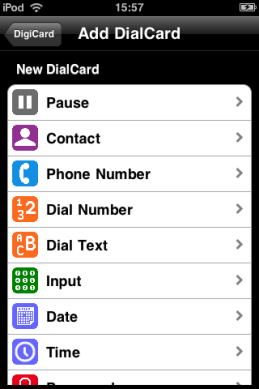
DialCards
 Pause
Pause
Pause card enables you to insert a pause into the calling number.
 Contact
Contact card enables you to select a person from your address book. To prepare your call, DigiCall asks you to choose a phone number for this person so it could be inserted to your calling number.
 Phone
Phone
Phone card enables you to select a person's phone number within your address book. This phone number is automatically updated when modifying it in your address book.
 Number
Number card enables you to enter any number that will then be inserted to the calling number.
 Text
Text
Text card enables you to enter any text that will then be converted to numbers and inserted to the calling number.
 Keyboard
Keyboard card enables you to enter a number. To prepare your call, DigiCall asks you to enter a number so it could be inserted to your calling number.
 Date
Date
Date card enables you to select an offset from the calling date and a date format. When calling, Digicall will use this offset to calculate the date and add it to the calling number using the chosen date format.
 Time
Time
Time card enables you to select an offset from the calling time and a time format. When calling, Digicall will use this offset to calculate the time and add it to the calling number using the chosen time format.
 Password
Password card enables you to enter any private number but without displaying it into DialCard.
 Wait
Wait
Wait card enables you to insert a wait into the calling number. Following cards will be dial once you have released the wait.
 Break
Break
Break card enables you to insert a break into the calling number. All cards following this break are ignored.
Release
DigiCall v1.0 (1.0.1) - released in 2012
DigiCall v1.0 (1.0.1) - released on December 8th, 2011
DigiCall v1.0 (1.0.1) - released on November 10th, 2011
Support
Do not hesitate to ask for support regarding bug or if you want to see new features added.
For your request, please mail me at support@frero-apps.fr
© FreRo Apps - All rights reserved